Learn How To Manage Your Rental Property on Airbnb
Get access to our 5-day training course on managing your vacation rental property in Dubai.
Download GuideAirbnb message templates will save you the hassle of answering the same questions across multiple guest stays.
As an Airbnb management company in Dubai, we’ve seen our fair share of “Where’s the Wi-Fi?” and “I can’t get in” messages.
Over time, we’ve learned which messages are worth automating, which need a human touch and which Airbnb already sends for you.
With two years of experience serving guests across 10,000+ booked nights, we’ve put together 25 Airbnb message templates you can copy, tweak and send throughout the guest journey.
Let’s get into it!
We’ve created 25 Airbnb message templates for the different situations you might deal with throughout a guest’s stay.
Use the table below to find the message you need, then jump to the template and make it your own.
| Template | Stage | When to send | Automate? |
| Answer a pre-booking question | Inquiry | Within the hour | Quick reply |
| Dates aren’t available | Inquiry | Within the hour | Quick reply |
| Decline a request that breaks house rules | Inquiry | Within the hour | Personal |
| Discount request | Inquiry | Within the hour | Quick reply |
| Guest asks to chat on WhatsApp before booking | Inquiry | Within the hour | Quick reply |
| Booking confirmed: what happens next | Booking | Right after booking | Yes |
| Documents needed before arrival | Booking | Right after booking | Yes, where required |
| Arrival logistics | Pre-arrival | 3 days before check-in | Yes |
| Early check-in reply | Pre-arrival | When asked | Quick reply |
| In-person or concierge check-in | Pre-arrival | 2 days before check-in | Quick reply |
| Day-of self check-in | Check-in | Morning of arrival | Yes |
| “I can’t get in” | Check-in | Immediately | Personal |
| Running late or arriving at night | Check-in | When the guest tells you | Quick reply |
| First-morning check (3+ nights) | Mid-stay | Morning after arrival | Yes, skip short stays |
| Something’s broken | Mid-stay | Immediately | Personal |
| Housekeeping or maintenance visit | Mid-stay | 24 hours before the visit | Quick reply |
| Noise or house-rule reminder | Mid-stay | As soon as it’s reported | Personal |
| Checkout reminder | Checkout | Evening before checkout | Yes |
| Late checkout reply | Checkout | When asked | Quick reply |
| Guest left something behind | Checkout | Same day | Quick reply |
| Issue found after checkout | Checkout | Within 24 hours | Personal |
| Thank-you and review request | Review | Day after checkout | Yes |
| Review reminder | Review | 7 to 10 days after checkout | Yes |
| Reply to private feedback | Review | Within 24 hours | Personal |
| Invite a past guest back | Review | When dates open up | Personal |
Note: Quick reply means you’ve saved the message in Airbnb and can pull it up when you need it. It’s useful for anything predictable, but you still decide when to send it.
The first message can set the tone for the entire booking. We’ve created five templates for the most common inquiry situations.
Send: within the hour and save as a quick reply
Hi [Guest first name], thanks for reaching out!
[Direct answer to their question.]
One thing worth knowing before you book: [honest detail, e.g. “the apartment is on the 3rd floor with no lift” or “parking is street-only”].
If that works for you, your dates are open and you can book straight from the listing. Any other questions, just ask here.
[Your name]
Homevy Tip: Don’t hide the details that might change someone’s decision. A guest who knows about the stairs before booking is less likely to be surprised by them later.
Send: within the hour and save as a quick reply
Hi [Guest first name], thanks for asking about [Property name].
Unfortunately, we’re booked for [requested dates]. We do have [alternative dates] available if your plans are flexible.
If those don’t work, you can save the listing to your wishlist and check back if your dates change.
[Your name]
Use this for parties, extra overnight guests, pets in a no-pet home or anything else your house rules don’t allow.
Send: within the hour and save as a quick reply
Hi [Guest first name], thanks for being upfront about [their request].
I’m afraid we can’t allow [party / extra guests / pets] at [Property name]. [One-line reason, e.g. “the building has strict quiet hours” or “the apartment sleeps a maximum of 4”].
If you’re still interested on those terms, we’d be happy to host you. If not, no hard feelings and good luck with the trip!
[Your name]
Send: within the hour and save as a quick reply
Hi [Guest first name], thanks for your interest in [Property name].
Our price for those dates already reflects [the season / local events / demand], so we can’t lower the nightly rate.
[Optional: “We do offer [X]% off stays of [Y] nights or more, which applies automatically at checkout.”]
Happy to answer anything else that helps you decide.
[Your name]
Homevy Tip: Only offer a discount if it’s already part of your pricing strategy. Promising one in a message and figuring out the details later is how a simple conversation becomes unnecessary admin.
Send: within the hour and save as a quick reply
Hi [Guest first name], thank you for reaching out! My name is [First Name], and I’m happy to help with anything you need!
Airbnb asks hosts to keep communication on the platform until a booking is confirmed, so let’s keep chatting here for now. I’ll answer just as quickly.
Once you’ve booked, we can confirm the best way to reach each other during your stay.
[Your name]
Homevy Tip: Keep the pre-booking conversation where the booking lives. It keeps the communication in one place and gives you a clear record of what was discussed.
Once a guest books, the message should be simple.

Photo by Ketut Subiyanto
Thank them, confirm the key dates, let them know when they’ll receive their arrival details, and ask one useful question, usually their expected arrival time.
Send: right after booking confirmation, and schedule quick reply on new reservation
Hi [Guest first name], you’re booked! Thanks for choosing [Property name].
Here’s what happens next:
Quick question so we can prepare: roughly what time do you expect to arrive?
See you soon,
[Your name]
Send: right after booking and only automate where local rules or your building require guest registration
Some cities and buildings require guest registration before arrival. If that applies to your property, ask for the required documents early. Nobody wants to be standing at the door filling out forms when they should be settling in.
Hi [Guest first name], we can’t wait to have you soak in Dubai’s ambience!
Before your arrival, we’ll love that you take a few minutes to complete these paperwork.
[City/building] requires us to register every guest before arrival.
Could you send [what’s needed, e.g. a photo of each adult guest’s passport or ID] by [deadline]?
You can upload it [through Airbnb messages / via the secure link Airbnb provides]. We only use it for registration.
Thanks for helping us get you checked in smoothly!
[Your name]
We’ve created three pre-arrival templates for the things guests are most likely to need before they reach the property.
The idea is to give guests useful information without sending them a second version of the Airbnb check-in instructions.
Send: 3 days before check-in
Hi [Guest first name], your stay at [Property name] is [3 days] away!
A few things to make arrival easy:
Our guest welcome guide book also has the Wi-Fi details, appliance instructions and a few of our favourite places nearby.
Is there anything else we can sort out before you arrive?
Looking forward to your arrival,
[Your name]
Homevy Tip: At Homevy, every property has its own digital guidebook, so we can keep the pre-arrival message short and point guests to everything else in one place. If you don’t have a digital guidebook download our free guest digital guide book.
Send: when the guest asks
YES:
Good news, [Guest first name]! The apartment will be ready from [early time] on [Check-in date], so feel free to come straight over. You’ll get the access details as usual.
NOT YET:
Thanks for asking, [Guest first name]. We have guests checking out that morning and need the time to clean properly, so check-in is from [Check-in time].
[Optional: “You’re welcome to drop your bags at [luggage option] while you wait.]
I’ll message you if it’s ready any earlier.
Send: 2 days before check-in
Not every building allows a lockbox and a code. For properties that require someone to meet the guest, make the arrangement clear before arrival so nobody is standing in the lobby wondering where to go.
Hi [Guest first name], we’re looking forward to your arrival at [Property name].
The building requires an in-person check-in, so [team member name] will meet you at [meeting point, e.g. the lobby concierge] at [agreed time].
Please bring [ID requirement] for each adult guest. If your arrival time changes, just message us here and we’ll adjust.
See you on [Check-in date]!
[Your name]
Check-in day is not the time for a five-paragraph welcome speech.
Photo by RDNE Stock project
The guest mainly needs two things: a clear way to get inside and someone who responds quickly if something goes wrong.
We’ve created three templates for the most common check-in situations: self check-in, access problems and late arrivals.
Send: morning of arrival
Hi [Guest first name], today’s the day!
You can check in any time from [Check-in time].
Your door code is [code], and the full step-by-step guide with photos is in your Airbnb trip under “Checking in”.
Wi-Fi: [Wi-Fi name] / [Wi-Fi password]
If anything doesn’t work at the door, message us here straight away and we’ll sort it.
[Your name]
For a smoother handover, see our guide to setting up a self check-in so guests don’t get stuck on and the smart locks and gadgets that make it easier.
Send: immediately
I’m so sorry about that, [Guest first name].
Can you try this first: [quick fix, e.g. “press the lock button, then enter the code followed by the tick key”]?
If that doesn’t work, [backup option, e.g. “the spare key is in lockbox [location], code [code]” or “[team member] is on the way and will be there in [X] minutes”].
I’m staying on this chat until you’re inside.
Homevy Tip: Have the backup plan ready before you need it. The worst time to figure out where the spare key lives is while a guest is messaging you from the lobby.
Send: when the guest tells you
No problem at all, [Guest first name]. Thanks for letting us know.
Self check-in works at any hour, so you can arrive whenever you land.
For in-person check-ins:
I’ve moved your check-in to [new time]. [Team member] will meet you at [meeting point].
A quick heads-up for a late arrival: [useful detail, e.g. “the main entrance locks at midnight, so use the side door on [street]”].
Safe travels!
[Your name]
You don’t need to message guests just for the sake of messaging them.

Photo by Adrienn
For longer stays, one quick check after the first night is enough. After that, let the guest enjoy the property and step in when they need you.
Send: morning after arrival
Good morning, [Guest first name]! I hope you had a wonderful rest.
I’m just doing a quick check-in.
If everything’s working as it should, no need to reply. If anything isn’t quite right, tell me here and I’ll get it fixed today.
Enjoy [City]!
[Your name]
Send: immediately after the guest reports it
Thanks for bringing our attention to this, [Guest first name], and sorry about the [issue].
We’ll [specific action, e.g. “our technician will be there between 2 and 4pm today”].
Optional workaround: “In the meantime, there’s a fan in the hallway cupboard.”
I’ll message you as soon as it’s fixed. If the timing doesn’t work for you, let me know and we’ll find another slot.
[Your name]
Send: at least 24 hours before the visit
Hi [Guest first name], a quick heads-up.
[Housekeeping / our technician] will visit [Property name] on October 4, 2026 between [time window] to [reason, e.g. “change linen and towels” or “service the AC”].
If that time doesn’t suit you, reply here and we’ll move it. Nobody will enter without letting you know first.
[Your name]
Send: as soon as the issue is reported
Hi [Guest first name], hope you’re enjoying your stay.
We’ve had a message from [the building / a neighbour] about [noise / the issue] this evening. Could you please [specific ask, e.g. “keep the volume down after 10pm”]? It’s one of the building’s rules, and we have to follow it too.
Thanks for understanding, and let me know if you need anything.
[Your name]
Homevy Tip: Keep this one factual and calm. You’re solving a problem, not starting an argument. A clear first reminder also gives you a record of what was communicated if the issue escalates.
Checkout should be simple. We’ve created four templates covering the situations hosts deal with most.
Send: evening before checkout
Hi [Guest first name], I hope you’ve had a great stay!
Just a reminder that checkout is tomorrow, [Checkout date], by [Checkout time].
Before you go, please:
No need to strip the beds or take out the bins. We’ll handle that.
Safe travels home,
[Your name]
Homevy Tip: Every task you ask guests to do is one more thing that can go wrong. Keep the list to what protects the property, and let your turnover cleaning checklist handle the rest.
Send: when the guest asks
YES:
Hi [Guest first name]! We can extend your checkout to [new time] tomorrow.
However, there’s a fee of [amount], and I’ll send it through Airbnb.
Enjoy the extra time!
NOT POSSIBLE:
Thanks for asking, [Guest first name].
We have guests arriving tomorrow, so we need checkout by [Checkout time] to get everything ready for them.
[Optional: “You’re welcome to leave your bags at [luggage option] if you need to.”]
Send: same day
Hi [Guest first name], our team found your [item] after checkout, and it’s safe with us.
Would you like us to post it to you? If so, send your address here and we’ll share the shipping cost before sending.
Or, if you’re still nearby, you can collect it from [location] by October 4, 2026.
[Your name]
Send: within 24 hours of checkout
Hi [Guest first name], thanks again for staying with us.
During our post-stay inspection, we found [specific issue, e.g. “a crack in the glass coffee table”]. I’ve attached photos.
These things happen, and we’d like to resolve it simply. [Next step, e.g. “I’ll send a request through Airbnb’s Resolution Center for the repair cost of [amount], with the receipt.”]
If anything about this doesn’t look right to you, just reply here.
[Your name]
Homevy Tip: Stick to the facts. Don’t turn a broken coffee table into a courtroom drama. Our guide to handling guest damages on Airbnb walks through the full process.
We’ve created four post-stay templates to help you request for an honest review, sending a gentle reminder, responding to private feedback and inviting a past guest to stay again.

Photo by Homevy
The trick with reviews is not to overdo it. Ask once, remind them once if needed, then let it go.
Send: the day after checkout
Hi [Guest first name], thank you for staying at [Property name]!
We hope you got home safely.
If you have a minute, an honest review on Airbnb really helps future guests know what to expect, and it helps us keep improving.
If anything wasn’t quite right, we’d love to hear it here too.
Thanks again,
[Your name]
Send: 7 to 10 days after checkout
Hi [Guest first name], a quick final note from [Property name].
Airbnb’s review window for your stay closes on October 4, 2026. If you’d like to share how it went, you can do it from your Trips page. No pressure either way.
Wishing you a great rest of the year!
[Your name]
Send: within 24 hours
Use this when a guest tells you about a problem in a message rather than, or before, leaving a review.
Hi [Guest first name], thank you for telling us about [issue]. That’s genuinely useful, and I’m sorry it affected your stay.
We’ve [specific action, e.g. “replaced the mattress topper” or “added blackout curtains to the second bedroom”] so the next guests won’t have the same problem.
Thanks again for being honest with us.
[Your name]
Homevy Tip: If a guest gives you useful feedback, fix the problem. You don’t need to turn the conversation into a review negotiation.
If you got a negative review here’s how to deal with bad Airbnb reviews.
Send: when relevant dates open up
Hi [Guest first name], it’s [Your name] from [Property name].
You mentioned you might be back in [City] for [reason they gave, e.g. “the conference next spring”]. Those dates are open on the listing right now if you’d like to stay with us again.
Either way, it was a pleasure hosting you!
Homevy Tip: Keep the rebooking on Airbnb. Don’t turn a perfectly good repeat guest into an off-platform policy problem by moving the booking elsewhere.
Some Airbnb message templates look harmless until you check the rules.
Asking someone to move to WhatsApp before booking, offering a discount for booking directly, or promising something in exchange for a review can put you on the wrong side of Airbnb’s policies.
We’ve pulled together the common ones to avoid so you can save your templates without accidentally saving yourself a policy headache.
| Don’t write | Why | Use instead |
| “Message me on WhatsApp at [number]” before booking | Airbnb says hosts can’t ask guests to communicate outside the platform before a reservation is confirmed. | Template 5 |
| “Book direct next time and skip the Airbnb fees” | Airbnb prohibits moving current, future or recurring reservations off-platform. | Template 25 |
| “Please leave us a review on Google too” | Airbnb’s policies prohibit asking guests to leave reviews outside the platform. | Template 22 |
| “I’ve left you 5 stars, hope you’ll do the same” | Hosts and guests can’t pressure, coordinate or manipulate each other to influence reviews. | Template 22 |
| “Leave us 5 stars and we’ll refund the cleaning fee” | Reviews can’t be exchanged for discounts, refunds or other incentives. | Template 22 |
| “Send the late checkout fee to my bank account” | Airbnb’s policies restrict collecting reservation-related fees outside the platform, except where specifically authorised. | Template 19 |
Airbnb recommends keeping messaging on its platform even after a reservation is confirmed because it provides a clear record if an issue comes up.
Most stays need five planned messages: a booking confirmation, arrival logistics a few days out, a day-of check-in note, a checkout reminder the evening before, and a thank-you with a review request.
Yes. Airbnb’s scheduled quick replies send your templates automatically before or after events like a new reservation, check-in or checkout.
You set them up under Messages, then Settings, then Quick replies. Automate predictable information, and keep requests, complaints and problems personal.
Open the guest’s message thread, select the add (+) option and view their scheduled quick replies.
From there you can edit, skip or send early any upcoming message for that reservation without changing your master template.
To change it for everyone, edit the template under Quick replies.
For a typical stay, four to six planned messages is enough.
Airbnb already shares your detailed check-in instructions 48 hours before arrival and shows checkout instructions in the listing.
If your messages repeat those, guests start skimming, and they may miss the one message that actually matters.
These templates work best when they’re part of a bigger guest communication system.
You can automate the predictable messages, save the common replies as quick responses and still have someone ready to step in when a guest has a problem that doesn’t fit neatly into a template.
That’s how we approach guest communication at Homevy.

Photo by Homevy
For every property we manage in Dubai, our team handles the communication that happens around the stay, from screening and booking management to check-in, checkout and 24/7 multilingual support during the guest’s stay. Each property also gets its own digital guidebook, so guests can find answers without having to message the team for every little thing.
And sometimes, the best proof that the system works comes from the guests themselves.
Karen Despuig, one of Homevy’s guests, highlighted how responsive the team was before booking, during her stay and after checkout.
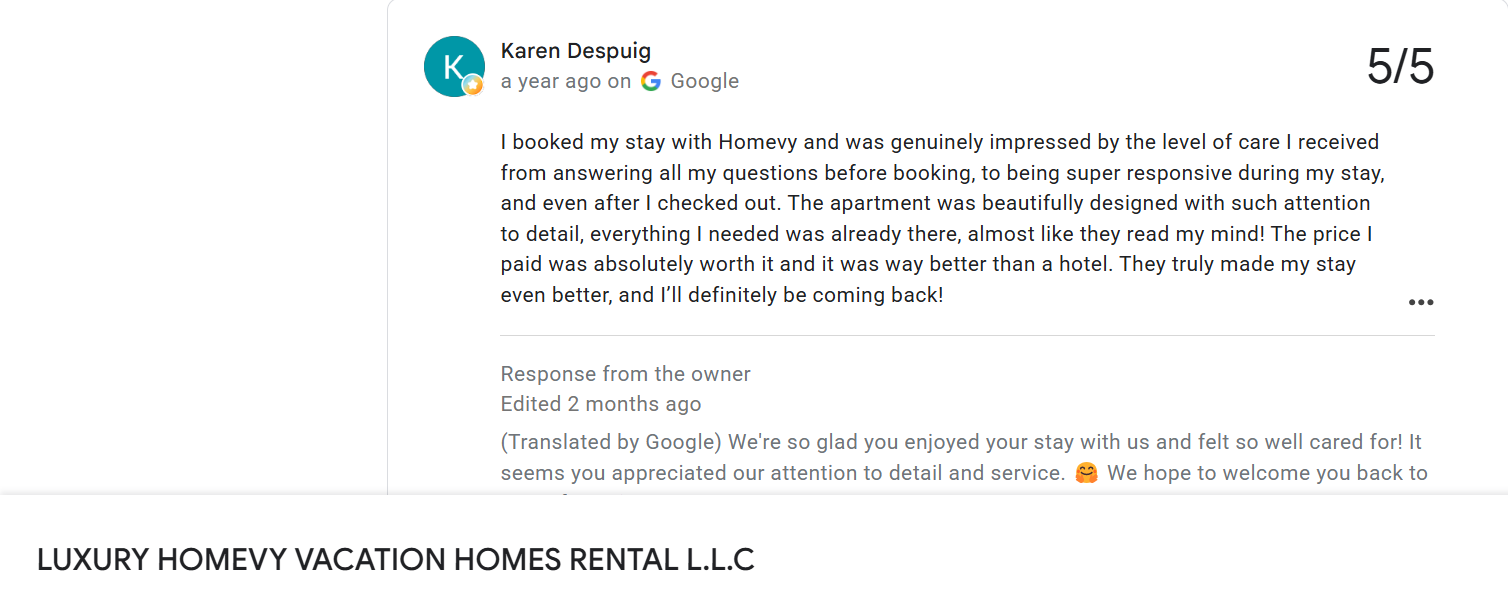
Source: Homevy Google Review
Another Homevy guest, Aderogba Adepo, gave five stars and mentioned an effortless check-in, the welcome letter and quick replies at 1am.
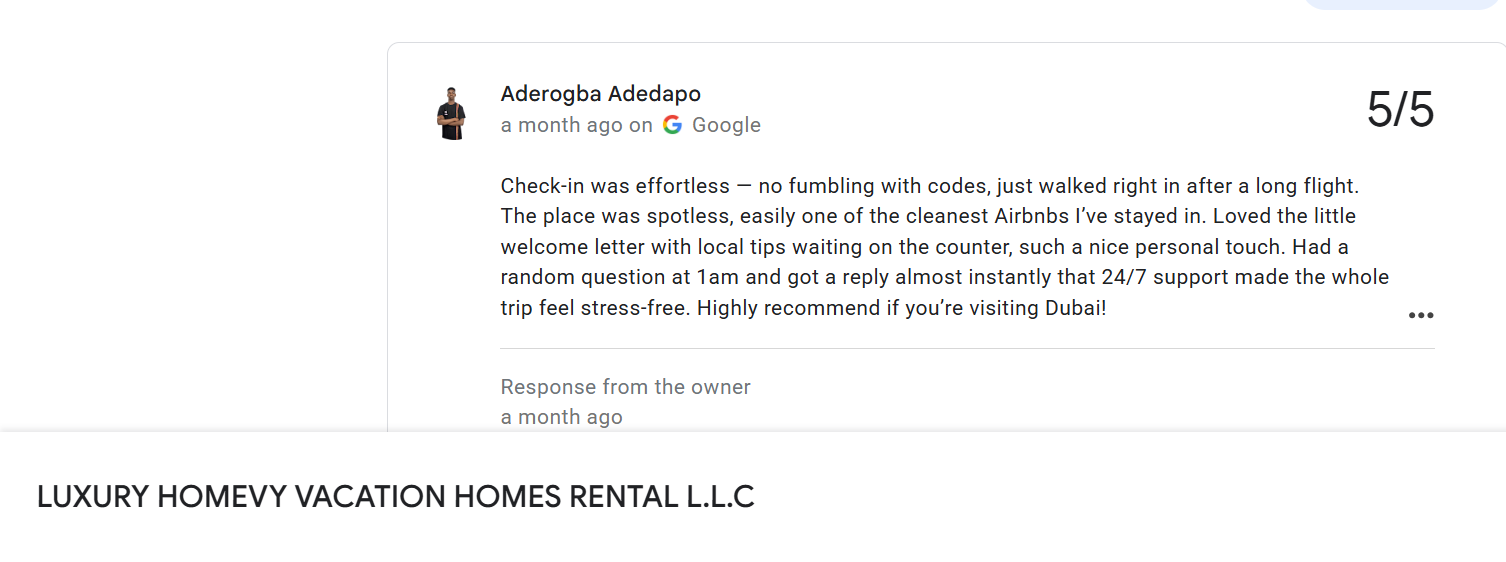
Source: Homevy Google Review
That’s ultimately what good Airbnb messaging is supposed to do: give guests the information they need when they need it, and make sure there’s a real person there when a template isn’t enough.
Want to see how we handle that beyond the templates? Here’s how our 24/7 guest communication and guest check-in and checkout services work.
Hosting in Dubai and want someone else to handle the messages, check-ins and everything in between? See how Airbnb management with Homevy works, or talk to our team.
Xoxo, Homevy

Get access to our 5-day training course on managing your vacation rental property in Dubai.
Download Guide